If you're still manually invoicing your cleaning clients, you're wasting hours every week and leaving money on the table. Once you get to the point that you're spending 1+ hours a week, it makes no sense to continue.
That's why every successful cleaning business automates payments, at least to some degree.
You have 2 main options for this, both will require building a custom tool or using an appointment scheduling tool like CleanSlot:
-
Fully automatic charges for fixed-rate services based on the time they were provided (can be risky if you change prices during appointments or aren't able to market appointments as no-shows effectively).
-
Manually trigger the payment, but do it online with Stripe: This is what CleanSlot allows you to do. You connect a payment processing account of yours (Stripe), CleanSlot saves your customer's credit card, and you just confirm the amount before charging it after you finish your work.
Why Manual Billing is Holding You Back
Handling invoices by hand is slow, stressful, and full of opportunities for mistakes. Late payments and disputes drain both your time and credibility.
Lost Revenue
Small service businesses can lose up to 10% of annual revenue to late or missed payments (1). That adds up fast when you factor in staffing, supplies, and marketing budgets.
Wasted Time
Sending invoices, following up, reconciling payments. It's tedious. Automation lets you reclaim hours each week for client work or business growth.
Client Friction
Manual invoices can confuse clients and spark disputes. Automation reduces awkward interactions and ensures clear, timely billing.
Automatic Payments vs. Confirmed Online Payments
Understanding the difference matters for your workflow.
Confirmed Online Payments
-
You review and adjust the final charge before billing.
-
Ideal when job costs may change during or after cleaning.
Automatic Payments
-
Charges clients instantly based on preset amounts at a specified time of time (or time after service.
-
Best for fixed-rate services.
-
Less flexible if adjustments are needed.
Automatic payments with a manual review is the safest for most cleaning businesses. It only takes a few minutes to process several payments each day, far faster than issuing manual invoices.
Setting Up Automatic or Confirmed Payments
I'll go through the required steps for either of these automation-involved approaches.
If you have development experience you could code your own little appointment management dashboard, but in most cases it's still not cost-efficient.
Step 1: Collect Payment Information Securely
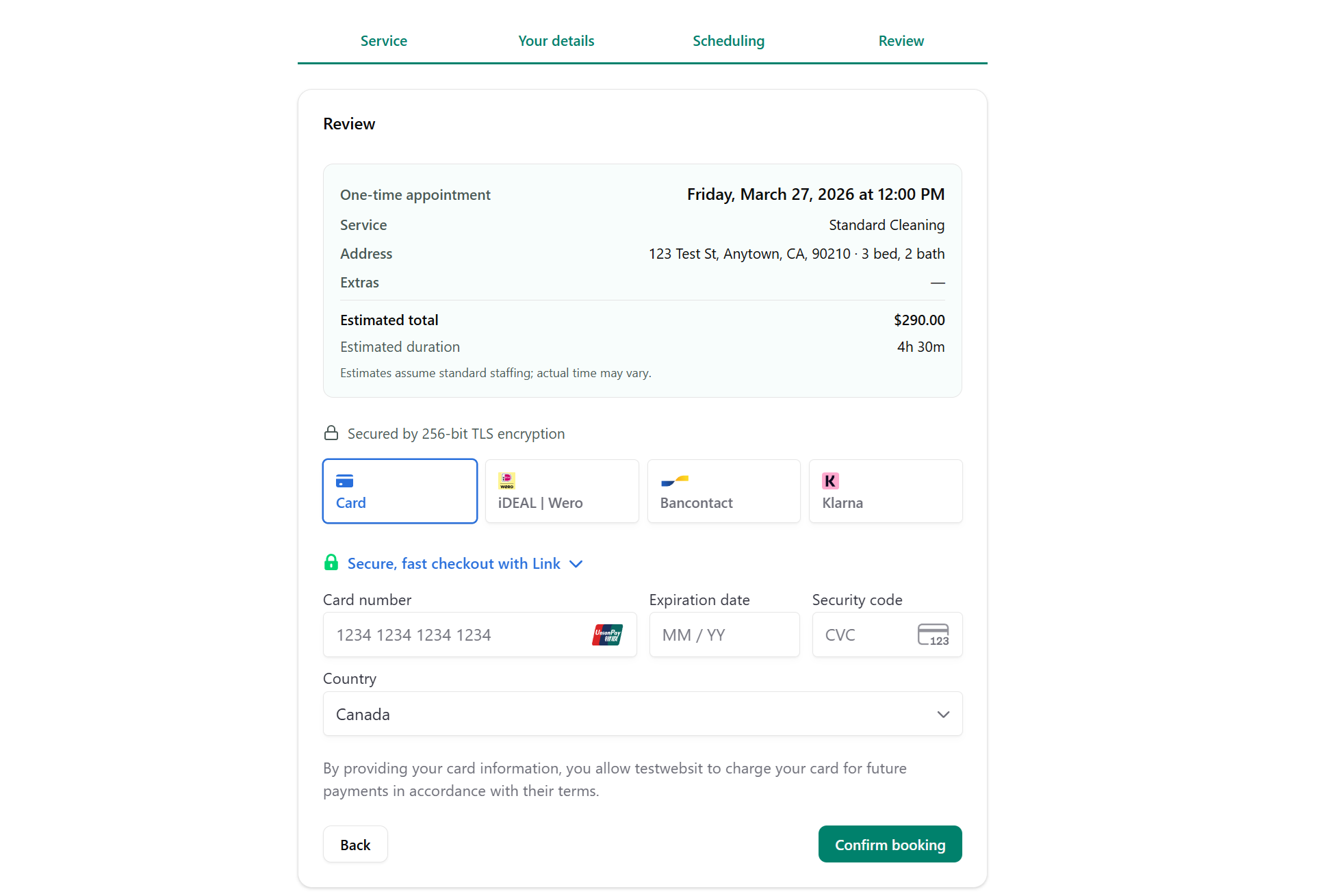
Store client payment details using a secure platform. Never keep card info in spreadsheets. It typically makes sense to collect credit card information during appointment booking.
For example, when a customer completes the intake form for an appointment for a CleanSlot user, this is the final step to reserve their spot:
Step 2: Communicate Clearly
Notify clients in advance about how and when they will be billed while you are at your appointment, or even before. Transparency reduces confusion and complaints.
Step 3: Handle Failed Payments
Failed payments happen regularly due to expired or declined cards. Send a secure link to update payment information and retry. Following up promptly keeps revenue flowing without disruptions.
Real-World Example: From Job Completion to Payment
Here's how a typical home cleaning business with 1-10 employees would design a workflow for payments:
-
Staff completes a cleaning job.
-
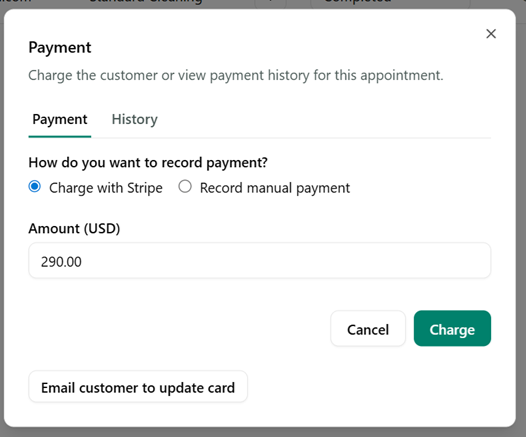
You review the service in CleanSlot and confirm or adjust the charge for extra tasks.
-
Payment is processed, and the transaction is logged automatically.
-
Client receives a notification that they've been charged (although you control this in Stripe).
This simple flow ensures accuracy, minimizes disputes, and saves you hours compared to manual invoicing.
If it sounds complicated, it's not. In CleanSlot it's literally 2 clicks in most cases.
Common Mistakes to Avoid
Poor Communication
Pre-charge notifications prevent confusion and disputes.
Skipping Monitoring
Credit cards that customers reserve spots with will fail (usually 1-5%). It's typically not malicious, there's a number of reasons it can happen.
In the vast majority of cases you just need to send them a link to update the credit card you store for them and re-charge them once they do. But this is a manual retry still, so you need to review them regularly so that you get paid for all past work.
Overcomplicating Processes
Adding unnecessary tools or integrations wastes time. Stick with a system that fits your workflow.
Forgetting Adjustments
Always verify charges for variable jobs. Skipping this step can lead to overcharging or unhappy clients.
Benefits of Automating Payments
-
Predictable Revenue: Payments arrive on schedule.
-
Time Savings: Focus on client work, marketing, or hiring instead of chasing invoices.
-
Professional Image: Organized, transparent billing increases client trust.
-
Reduced Errors and Disputes: Final charges can be adjusted, minimizing complaints.
-
Scalable Workflow: As your client list grows, your payment system grows with you.
FAQs and Troubleshooting
Q: What if a card gets declined repeatedly?
A: Contact the client, send a secure update link, and retry. Consistent follow-up maintains revenue.
Q: Can I adjust a payment after it's been processed?
A: Confirmed payments allow pre-approval adjustments. Post-processing changes may require refunds.
Q: How do I handle clients who refuse online payments?
A: If you use an online appointment tool you can still manually create appointments through the dashboard without storing a customer's payment information. Then you can accept payment however you'd like (online transfer, cash, etc.).